
If you’ve ever picked up a ukulele and immediately hit a wall trying to memorize chord shapes, you know the problem: most reference tools are either buried in a browser tab, cluttered with ads, or completely useless without Wi-Fi. I wanted something cleaner — a focused, offline tool that actually helps you learn, not just look things up.
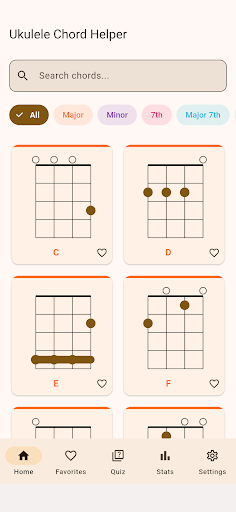
I built Ukulele Chord Helper because I kept reaching for my phone mid-practice and getting distracted by the internet. The app I wanted didn’t exist, so I made it. It covers the chords you actually need when you’re starting out, and it does so without requiring an account, a subscription, or a signal bar in sight.
What It Does
- 35-chord library: Covers major, minor, dominant 7th, major 7th, minor 7th, and suspended chords — each displayed with clear fret diagrams, finger numbers, and barre indicators.
- Real synthesized sound: Tap any chord to hear it played back using a Karplus-Strong synthesis engine that accurately models the four GCEA strings, including the reentrant high-G. No pre-recorded samples, no loading delays.
- Three quiz modes: Test yourself by identifying a chord from its diagram, recognizing a chord by ear, or matching a chord name to the correct diagram. Active recall and ear training in one place.
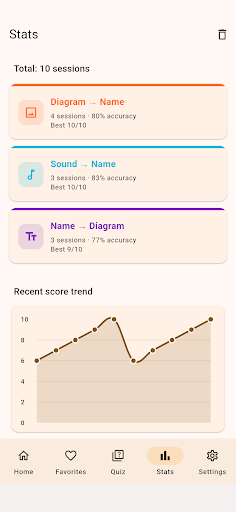
- Learning stats: Track your session history, accuracy over time, and performance by chord category. A score trend chart lets you see progress at a glance, and you can back up or restore your stats as a JSON file.
- Search, filter, and favorites: Find chords quickly by name or category. Mark the ones you’re working on as favorites. Switch between dark mode, light mode, or system default.
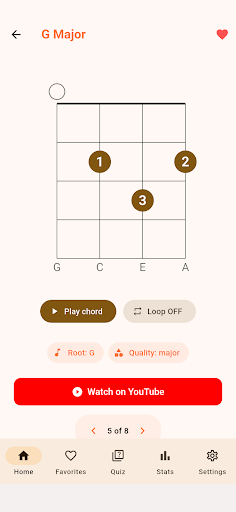
The chord sound engine was the part I spent the most time on. I didn’t want to ship a app with a folder full of audio files — that felt lazy, and it would have made the app heavier than it needed to be. The Karplus-Strong algorithm generates each strum in real time, string by string, which means the playback actually reflects the physical behavior of a plucked string. It’s not perfect, but it’s genuinely useful for ear training.
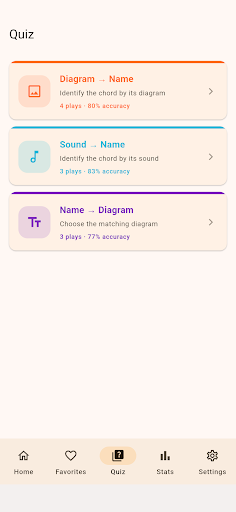
The quiz modes were the other priority. Browsing chord diagrams is passive — you look, you think you understand, and then you forget. The three quiz formats push you to recall chords under mild pressure, which is how the shapes actually stick. The sound-to-name mode in particular is something I haven’t seen done well in other ukulele apps, and it’s become my favorite way to practice during short breaks.
This app is built for ukulele beginners and self-taught players who want a fast, no-nonsense chord reference they can use anywhere — on the couch, on a commute, or in a room with no Wi-Fi. It’s also useful for intermediate players who want to drill their ear training or lock in a few chord shapes they keep second-guessing. If you already know every chord cold, this probably isn’t for you. But if you’re still building your vocabulary, I think it’s worth a try.
Version 1.0.0 is live on the Google Play Store now. It’s free, with optional ads. Give it a spin, and if something feels off or missing, I’m always reading feedback.
Download on Google Play: Ukulele Chord Helper – Chords
Official page: reactiveworks.dev/apps/ukulelechordhelper
Leave a Reply