
If you’ve ever stared at a blank prompt box in Stable Diffusion or Midjourney, wondering what tags to use to get the image in your head, you know the struggle. AI image generation is powerful, but building effective prompts — especially long, detailed ones — can feel like memorizing a second language.
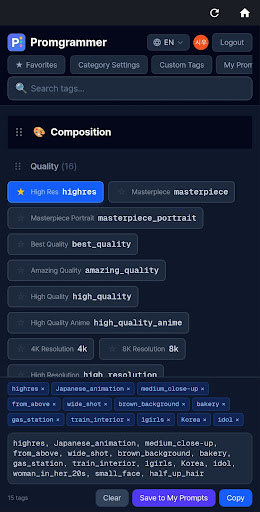
I built Promgrammer to solve that exact problem. Instead of hunting through Discord servers or bookmark folders for the right tags, you get 1700+ pre-organized tags across 18 categories. Browse, tap, reorder, and copy. That’s it.
What it does
Promgrammer is a tag library and prompt assembly tool. You browse categories like Composition, Lighting, Pose, or Facial Expression, tap the tags you want, and they’re added to your prompt automatically. Drag to reorder them, hit copy, and paste into your AI tool of choice.
The 18 categories cover everything from technical settings (depth of field, camera angles, lighting) to creative choices (theme, color palette, clothing, accessories). There’s even a dedicated Negative category for filtering out common AI artifacts like malformed hands or extra limbs.
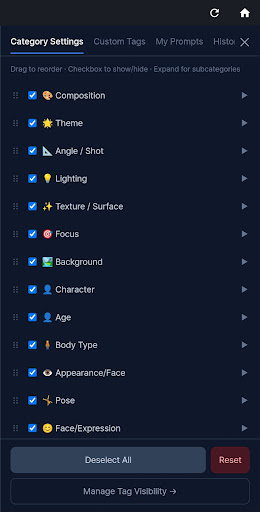
Beyond the tag library, Promgrammer includes several workflow features I found myself needing:
- Real-time search — Filter by tag name, category, or subcategory as you type.
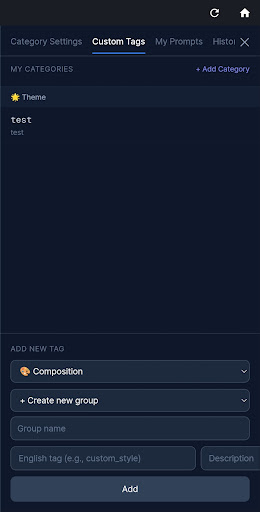
- Custom tags — Add your own tags and categories. Perfect for LoRA trigger words or personal shorthand.
- Favorites — Mark frequently used tags and filter to show only those.
- Prompt saving — Save completed prompts with model name, seed value, LoRA settings, and notes.
- Image gallery — Attach generated images to saved prompts so you can visually track what worked.
- History — Previously copied prompts are auto-saved for easy recall.
- Tag hiding — Clean up your interface by hiding tags you never use.
All tags are displayed in four languages: English, Korean, Japanese, and Chinese. The app works with any prompt-based image generator — Stable Diffusion (1.5, SDXL, 3.0), Midjourney, NovelAI, DALL-E, and Flux.
Who it’s for
This is built for anyone who generates AI images regularly but doesn’t want to memorize hundreds of tags or keep a separate reference doc open. If you’re new to Stable Diffusion and overwhelmed by prompt syntax, this gives you a visual starting point. If you’re experienced but tired of retyping the same combinations, the favorites and custom tags will speed up your workflow. And if English isn’t your first language, the multilingual tags make it easier to learn what each term does.
The prompt saving and image gallery features are especially useful if you’re iterating on a style or character design — you can compare results side-by-side and see exactly which tags produced which output.

All core features are available immediately. Sign in with Google to unlock favorites, prompt saving, custom tags, and the image gallery. If you’ve been looking for a faster way to build prompts without sacrificing control, give Promgrammer a try.
Download on Google Play: Promgrammer-AI Prompt Builder
Official page: reactiveworks.dev/apps/promgrammer
Leave a Reply