You know the Pomodoro Technique works—25 minutes of focus, then a break. But after a few weeks, you realize that 25 minutes works great for email but feels rushed for deep coding, and way too short for a workout warmup. The classic preset doesn’t adapt to you. That’s the gap I wanted to close.
I built My Own Pomodoro because I was tired of timers that treated every focus session the same. I wanted to see patterns in how long I actually stayed focused, understand what worked better for different kinds of tasks, and get smarter about planning my next session based on real data from my own history—all without signing up, creating an account, or sending anything to the cloud.
What It Does
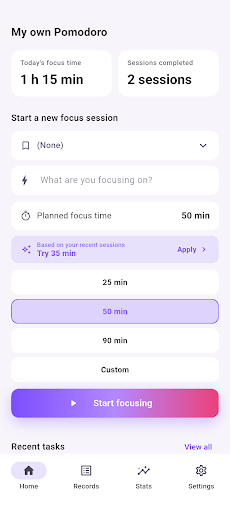
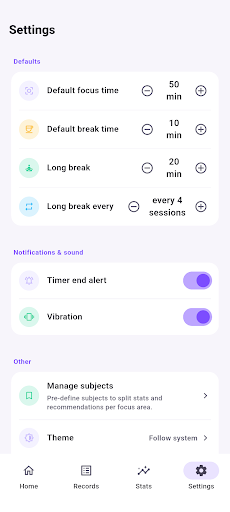
- Flexible timer presets. Start with 25, 50, or 90 minutes, or set a custom length. Name your task, pick a subject (like “Writing” or “Algorithms”), and let the app track everything automatically.
- Adjust mid-session. Need more time? Extend by 5 or 10 minutes. Want to stop early? The app records every adjustment on your session timeline so nothing gets lost.
- Per-subject insights. Create subjects once—”French vocab,” “Gym,” “Design”—and see your average focus time calculated separately for each. Get recommendations tailored to what actually works for that specific task type.
- Smart recommendations. Based on your recent average, the app suggests a session length for your next timer. If you usually sustain 45 minutes on coding, that’s what it’ll propose.
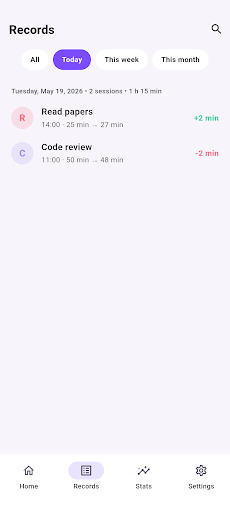
- Complete session history. Search by task name, filter by date range, edit task details or memos, and export your entire session log as JSON anytime you want to back it up or switch phones.
Stats That Actually Matter
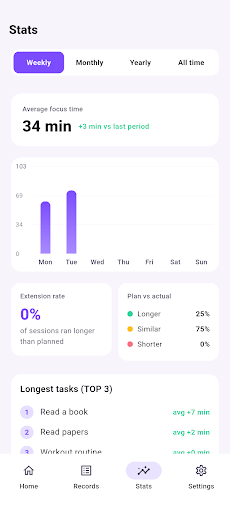
The app tracks weekly, monthly, yearly, and all-time averages for actual focus time. You’ll see a breakdown of how often sessions ran longer or shorter than planned, and spot your longest tasks at a glance. Every session status—Completed, Stopped, or Parked—counts differently in the stats, so you get an honest picture of what you’re achieving.
Built for Privacy
No account. No cloud. No third-party trackers. Every session, memo, subject, and stat lives only on your phone. If you want a backup, just export to JSON. The only thing you’ll see is a single banner ad at the bottom of the screen.
The app supports Korean and English, switches between light, dark, and system themes, and uses a customizable timer alert—choose from Soft, Bell, or Chime, or go silent if you prefer.
Who This Is For
If you’ve ever wondered why your focus sessions are inconsistent, or felt like a generic timer doesn’t fit your actual working style, this is for you. Students, freelancers, remote workers, and anyone doing deep focus work will find value in tracking their own patterns and letting that history shape their next session. You don’t need to be a productivity guru—just someone who wants to understand and improve how you spend your focused time.
My Own Pomodoro is free on Google Play. Download it, start a session today, and see what your focus data tells you. Questions or feedback? Reach out at siwooeo@gmail.com.
Play Store에서 다운로드: My Own Pomodoro: Focus Timer
Official page: reactiveworks.dev/apps/pomodoro
Update history: ahngo13.github.io
Leave a Reply