You finish a take, your coach flags something around the 1:20 mark, and by the time you get home you’ve already half-forgotten where it was. Vocal Recorder is built to close that gap — record a session, tap markers directly onto the waveform, and replay later with every weak spot exactly where you left it.
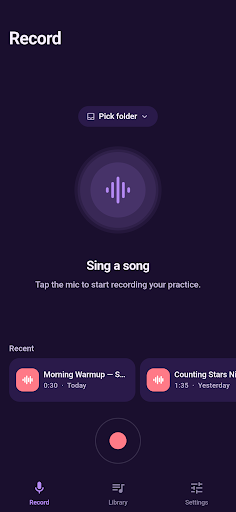
I built this because I kept running into the same problem: voice notes and scribbled timestamps are no substitute for actually hearing the moment again in context. I wanted something closer to how a coach thinks — pinpointing breath, pitch, accent — but available the second practice ends, on the device already in my pocket.
The app launched on iOS earlier this year, and the response from singers and karaoke regulars made it clear an Android version was overdue. Version 1.0.0 is now live on Google Play, with a refreshed launcher icon, smoother playback controls, and an improved library layout.
What it does
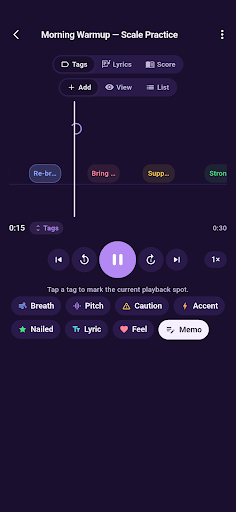
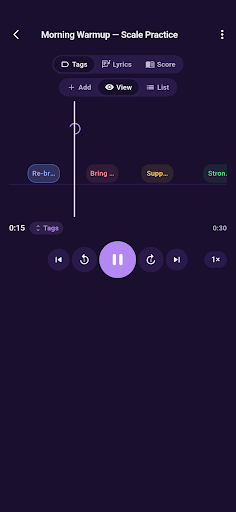
- Waveform notes in seven categories. After recording a take, tap markers anywhere on the waveform — breath, accent, pitch, caution, nailed, feel, or lyric. Every annotation is anchored to that exact moment so replaying it later is immediate and precise.
- Sheet music alongside playback. Attach a PDF score to any recording and the Player’s Score tab shows it right next to the audio. Pinch to zoom in on a passage, swipe to turn pages — no app-switching mid-session.
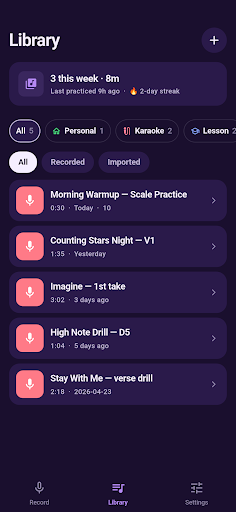
- Auto-organized folders and custom tags. The library comes pre-built with Personal, Karaoke, and Lesson folders. Layer on your own tags — genre, key, coach name — for finer sorting without any upfront setup.
- Daily streak tracking. A running count of consecutive practice days sits at the top of your library. Small, but it turns out a visible streak is a surprisingly effective nudge.
- Import, backup, and restore. Bring in existing m4a or mp3 files and annotate them the same way you would a fresh recording. Export your full library as a zip to back it up or move it to another device.
On privacy: there is no account required, and everything — recordings, notes, PDFs — lives on your device. No data is sent to a server. Ads are served through Google AdMob; the full privacy policy is available under Settings inside the app.
Who it’s for
If you take singing lessons and want to revisit your coach’s feedback at home rather than relying on memory, this is built for you. It also fits karaoke regulars who want an honest playback of where the breath actually dropped, and anyone trying to build a consistent daily vocal habit and wanting some record of the progress. The annotation categories — breath, pitch, accent — are specific enough to be useful without requiring any music theory background to make sense of them.
Vocal Recorder – Sing & Notes is free to download on Google Play. If you give it a try, I’d genuinely appreciate a rating or a review — for an indie release, that kind of signal makes a real difference in visibility, and it helps me understand what to build next.
Play Store에서 다운로드: Vocal Recorder – Sing & Notes
iOS(App Store)에서도 다운로드: Vocal Recorder – Sing & Notes
Official page: reactiveworks.dev/apps/vocalpracticerecorder
Update history: ahngo13.github.io
Leave a Reply