Tag: tools

  • I Built a Simple Attendance Tracker for Group Organizers

    I Built a Simple Attendance Tracker for Group Organizers

    If you run a weekly study group, book club, sports team, or any recurring meetup, you know the pain of tracking attendance. Who came last week? Who’s been absent three times in a row? I got tired of juggling spreadsheets and paper lists, so I built a lightweight Android app to handle it.
    모임 출석체크 - 모임 출첵, 모임 관리, 모임 출석부 screenshot 1

    I’m the organizer of a local meetup group, and every session I’d scramble to remember who attended and when. I needed something dead simple: add members, tap their names when they show up, and review the history later. No bloated features, no social networking nonsense, just a digital attendance sheet that works offline.

    The app started as a personal tool, but after using it for a few months, I figured other organizers might find it useful too. So I polished it up and put it on the Play Store.

    What It Does

    The app is built around three core workflows:
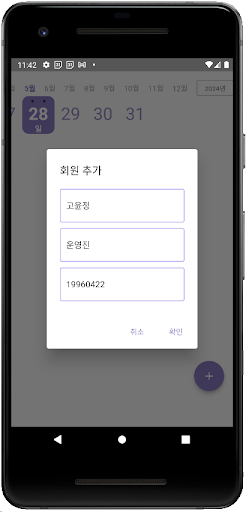
    모임 출석체크 - 모임 출첵, 모임 관리, 모임 출석부 screenshot 2
    • Member management: Add people to your group roster with their names and any relevant details. You can edit or remove members as your group evolves.
    • Attendance logging: When someone shows up to a session, tap their name to mark them present. It’s faster than calling roll or passing around a sign-up sheet.
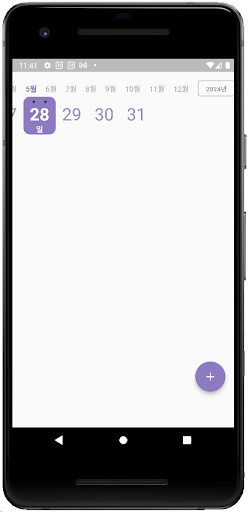
    • History review: View past attendance records to see patterns—who’s a regular, who’s falling off, or when participation dipped. You can also delete old records if needed.
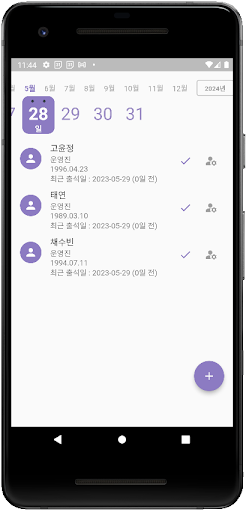
    모임 출석체크 - 모임 출첵, 모임 관리, 모임 출석부 screenshot 3

    That’s it. No account creation, no cloud sync, no permissions beyond basic storage. Your data stays on your device.

    Who It’s For

    This app is for anyone who leads a group and needs a better way than pen and paper to track participation. Think study group coordinators, volunteer organizers, club presidents, fitness class instructors, or hobbyist meetup hosts. If you’re tracking the same set of people across multiple sessions and you want a record of who attended when, this will save you time.
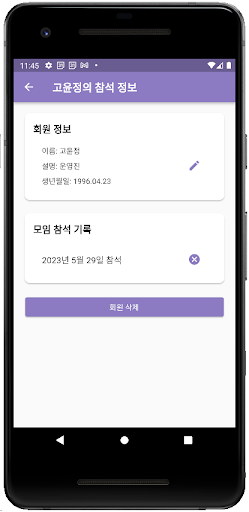
    모임 출석체크 - 모임 출첵, 모임 관리, 모임 출석부 screenshot 4

    It’s not designed for large organizations or formal HR attendance systems—it’s intentionally simple. If you need payroll integration or biometric check-ins, look elsewhere. But if you just want a straightforward tool that does one thing well, give it a shot.

    The app is free and available now on the Play Store. I’ll keep fixing bugs and adding small improvements as they come up. If you run into issues or have feature requests, drop me a line—I’m always listening.


    Download on Google Play: 모임 출석체크 – 모임 출첵, 모임 관리, 모임 출석부

    Official page: reactiveworks.dev/apps/attendance
  • I Built an App to Remember Every Apartment I Toured

    I Built an App to Remember Every Apartment I Toured

    If you’ve ever toured five apartments in one day and then completely forgotten which one had the weird smell and which had amazing natural light, you know the struggle. Scribbled notes get lost, photos pile up without context, and by the end of the week you can’t remember which unit the real estate agent was even talking about.

    I built Room Search History to solve exactly this problem. After losing track of my own apartment tours one too many times, I created a simple checklist app that lets you record everything about a property in seconds—no typing required, just taps.

    방찾기 기록 - 체크리스트, 비교, 메모 screenshot 1

    What it does

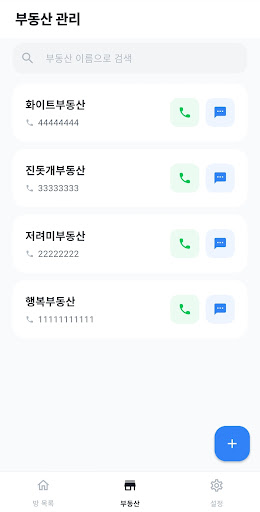
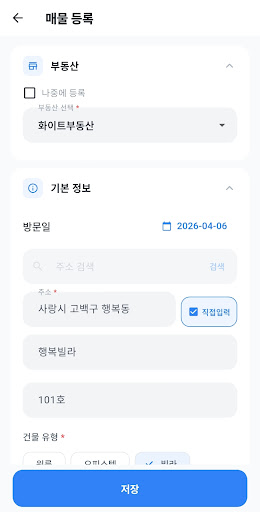
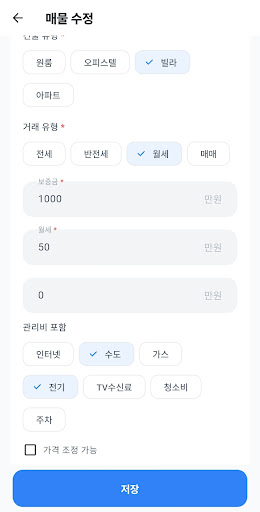
    The app is built around speed and comparison. Instead of fumbling with notes while the agent waits, you tap through a structured checklist covering over 40 criteria: building type, number of rooms, floor level, lighting quality, heating system, included appliances, and more.

    • Quick checklist recording — Capture building details, transaction type, condition, and amenities with just a few taps. No manual typing needed.
    • Filter and compare properties — View only the listings that match your criteria (price range, building type, transaction type) and compare them side-by-side.
    • Real estate agent management — Save agent contact info and call or text them directly from the app without switching windows.
    • Address search with maps — Use integrated address lookup to save exact locations and verify them on a map.
    • Photo attachments — Snap pictures during your tour or pull from your gallery, then attach them to each listing for visual reference.
    • Star ratings and memos — Rate each property at a glance and jot down freeform notes for things the checklist doesn’t cover (like “landlord seemed sketchy” or “neighbor’s dog barked the entire time”).
    • Share your records — Capture any listing as an image or share it with roommates, family, or friends who are helping you decide.
    방찾기 기록 - 체크리스트, 비교, 메모 screenshot 2

    Who it’s for

    This app is for anyone hunting for a new place to live—whether that’s a studio, an apartment, or any kind of rental unit. It’s especially useful if you’re viewing multiple properties in a short timeframe and need to keep them straight. If you’ve ever wished you could remember exactly what the real estate agent said about utilities, or which unit had the south-facing windows, this is for you.

    방찾기 기록 - 체크리스트, 비교, 메모 screenshot 3

    Everything is stored locally on your device. No account registration, no server uploads, and no internet connection required except for address lookups. Your data stays yours.

    Why I built it this way

    I wanted something faster than a spreadsheet and more structured than random phone notes. Paper checklists work, but they’re a pain to carry around, easy to lose, and impossible to search or filter later. This app gives you the structure of a checklist with the flexibility of digital notes—and you always have your phone with you anyway.

    방찾기 기록 - 체크리스트, 비교, 메모 screenshot 4

    The core idea is simple: capture information when you’re standing in the apartment, then compare everything later when you’re ready to make a decision. No more relying on memory or trying to decipher cryptic notes you took three weeks ago.

    If you’re in the middle of apartment hunting and drowning in listings, give Room Search History a try. It’s free, it works offline, and it might just save you from signing a lease on the place you actually hated.


    Download on Google Play: 방찾기 기록 – 체크리스트, 비교, 메모

    Official page: reactiveworks.dev/apps/room-log