Tag: android

  • I Built a Simple Attendance Tracker for Group Organizers

    I Built a Simple Attendance Tracker for Group Organizers

    If you run a weekly study group, book club, sports team, or any recurring meetup, you know the pain of tracking attendance. Who came last week? Who’s been absent three times in a row? I got tired of juggling spreadsheets and paper lists, so I built a lightweight Android app to handle it.
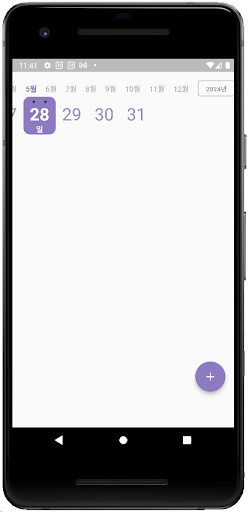
    모임 출석체크 - 모임 출첵, 모임 관리, 모임 출석부 screenshot 1

    I’m the organizer of a local meetup group, and every session I’d scramble to remember who attended and when. I needed something dead simple: add members, tap their names when they show up, and review the history later. No bloated features, no social networking nonsense, just a digital attendance sheet that works offline.

    The app started as a personal tool, but after using it for a few months, I figured other organizers might find it useful too. So I polished it up and put it on the Play Store.

    What It Does

    The app is built around three core workflows:
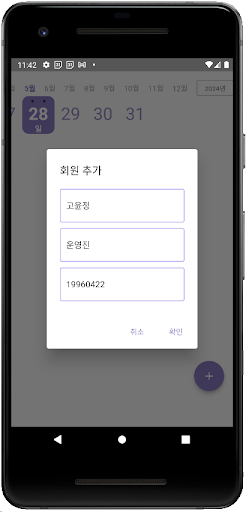
    모임 출석체크 - 모임 출첵, 모임 관리, 모임 출석부 screenshot 2
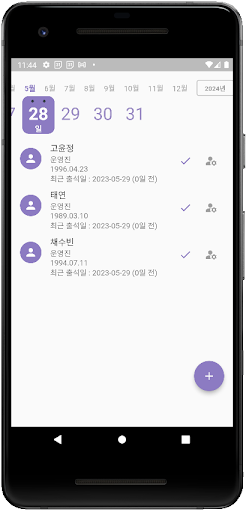
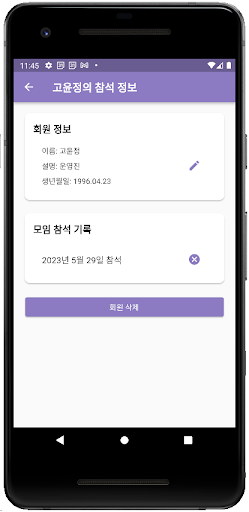
    • Member management: Add people to your group roster with their names and any relevant details. You can edit or remove members as your group evolves.
    • Attendance logging: When someone shows up to a session, tap their name to mark them present. It’s faster than calling roll or passing around a sign-up sheet.
    • History review: View past attendance records to see patterns—who’s a regular, who’s falling off, or when participation dipped. You can also delete old records if needed.
    모임 출석체크 - 모임 출첵, 모임 관리, 모임 출석부 screenshot 3

    That’s it. No account creation, no cloud sync, no permissions beyond basic storage. Your data stays on your device.

    Who It’s For

    This app is for anyone who leads a group and needs a better way than pen and paper to track participation. Think study group coordinators, volunteer organizers, club presidents, fitness class instructors, or hobbyist meetup hosts. If you’re tracking the same set of people across multiple sessions and you want a record of who attended when, this will save you time.
    모임 출석체크 - 모임 출첵, 모임 관리, 모임 출석부 screenshot 4

    It’s not designed for large organizations or formal HR attendance systems—it’s intentionally simple. If you need payroll integration or biometric check-ins, look elsewhere. But if you just want a straightforward tool that does one thing well, give it a shot.

    The app is free and available now on the Play Store. I’ll keep fixing bugs and adding small improvements as they come up. If you run into issues or have feature requests, drop me a line—I’m always listening.


    Download on Google Play: 모임 출석체크 – 모임 출첵, 모임 관리, 모임 출석부

    Official page: reactiveworks.dev/apps/attendance
  • I Built a Lottery Scanner App for Korea’s Lotto 6/45

    I Built a Lottery Scanner App for Korea’s Lotto 6/45

    If you’ve ever stood in a Korean convenience store squinting at a lottery ticket wondering if you won anything, you know the friction. Korea’s Donghang Lottery (Lotto 6/45) tickets have QR codes, but checking results still meant visiting websites or using clunky official tools. I wanted something faster.

    So I built an all-in-one app specifically for Korean lottery players. It handles the entire workflow: scan your ticket’s QR code, check if you won, generate numbers for your next purchase, and track your history over time.

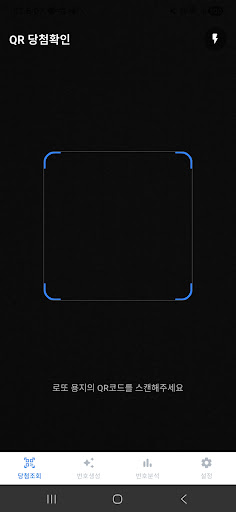
    동행복권 당첨조회 - QR스캔, 번호생성, 통계분석 screenshot 1

    Why I Built This

    I’m based in Korea and noticed that most lottery apps either did one thing well or tried to do everything poorly. Official tools were functional but slow. Third-party apps were bloated with ads or missing key features like historical data when offline.

    I wanted something lean: a tool that handled QR scanning instantly, gave me statistical insights without overwhelming charts, and let me manage my purchase history without needing a spreadsheet. The app is designed around the Korean lottery system, but the core problem—making lottery participation less tedious—applies anywhere tickets pile up and winning numbers blur together.

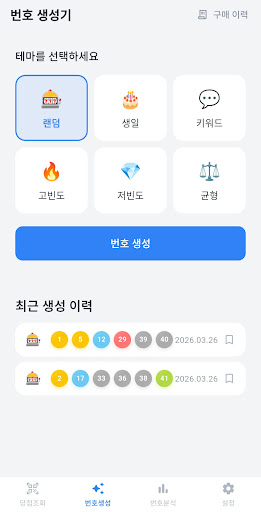
    동행복권 당첨조회 - QR스캔, 번호생성, 통계분석 screenshot 2

    What It Does

    The app is built around five main features, all tailored to how people actually use lottery tickets in Korea:

    • QR Scan Winning Check: Point your camera at the QR code on any Donghang Lottery ticket and get instant results. Flash support works even in dim lighting, and results pull from the official lottery database.
    • Themed Number Generation: Generate numbers completely at random, or use strategies like high-frequency picks from recent draws, birthdate combinations, or keyword-based selection. Every generated set saves automatically to your purchase history.
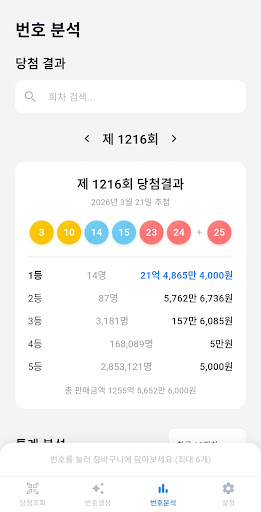
    • Statistical Analysis: View frequency charts for individual numbers, analyze odd/even and high/low distributions, spot sleeping numbers that haven’t appeared recently, and explore bonus number patterns. You can adjust the analysis range from the last 10 draws to the last 100, or set custom date ranges.
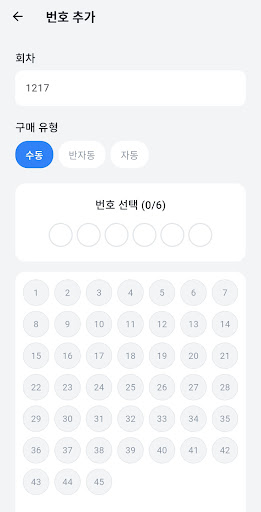
    • Purchase History Management: Log the numbers you actually bought and the app automatically matches them against draw results. It calculates your rank, prize amount, total spend, and total winnings at a glance. Export and import features let you back up your data safely.
    • Automatic Data Sync: Winning numbers update automatically after each draw. The app ships with full historical data from draw #1, so you can analyze past trends even without an internet connection.
    동행복권 당첨조회 - QR스캔, 번호생성, 통계분석 screenshot 3

    Who It’s For

    This is for anyone in Korea who plays Lotto 6/45 regularly and wants to skip the manual work. If you buy tickets weekly, forget to check results, or wonder whether your “lucky numbers” are actually lucky, this app consolidates everything into one place. It’s also useful if you’re the type who enjoys digging into patterns and frequency stats before picking numbers—not because it guarantees a win, but because it makes the process more intentional.

    The app isn’t affiliated with the official Donghang Lottery organization. It’s built on publicly available winning data. You’ll still need to buy tickets through official channels (retailers or the official website), but everything after that—checking, analyzing, tracking—happens here.

    동행복권 당첨조회 - QR스캔, 번호생성, 통계분석 screenshot 4

    Version 1.0.0 is live on the Play Store now. If you’re in Korea and tired of juggling multiple tools to manage your lottery habit, give it a shot. I built it to solve my own friction points, and I’m hoping it resonates with others who feel the same way.


    Download on Google Play: 동행복권 당첨조회 – QR스캔, 번호생성, 통계분석

    Official page: reactiveworks.dev/apps/dhlottery

  • Tracking What You Accomplished Instead of What You Didn’t

    Tracking What You Accomplished Instead of What You Didn’t

    Most productivity apps start with anxiety. They ask you to make lists of everything you haven’t done yet, then spend the day reminding you about it. I wanted something different: an app that lets you end each day feeling accomplished instead of guilty.

    That’s why I built What I Did (WID).

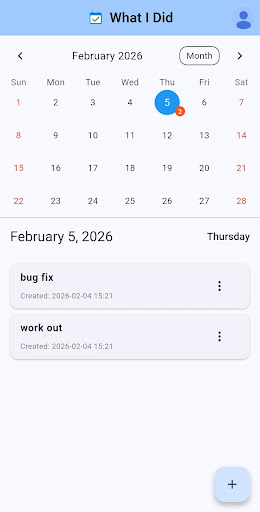
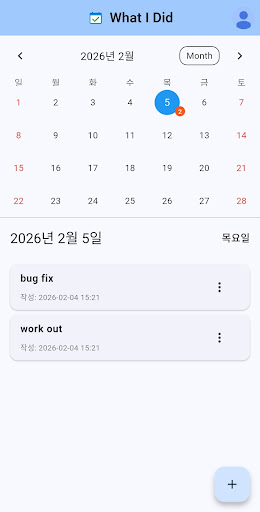
    What I Did - WID screenshot 1

    Why I Built This

    I got tired of to-do lists making me feel behind before the day even started. The constant pressure of unchecked boxes, overdue tasks, and that nagging feeling that I should be doing more—it was exhausting.

    So I flipped the model. Instead of tracking obligations, What I Did tracks accomplishments. You record what you actually did today, not what you think you should have done. Made breakfast? That counts. Took a walk? Write it down. Had coffee with a friend? Add it to your day.

    The shift is subtle but powerful. You’re building a record of how you spent your time, not a monument to your failures. Even on days that feel unproductive, you’ll be surprised how much you actually did.

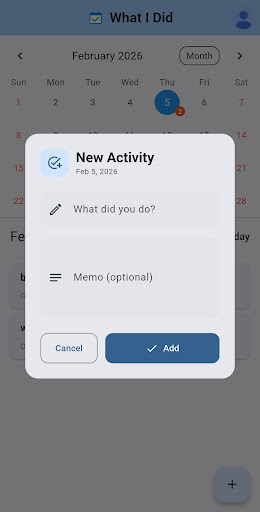
    What I Did - WID screenshot 2

    What It Does

    I kept the feature set intentionally minimal. Here’s what’s included:

    • Calendar-based tracking: Every activity gets recorded on a specific date. Open any day to see what you did, with visual markers showing which days have entries.
    • Quick entry system: Adding an activity takes seconds. Edit or delete entries whenever you need to—nothing is permanent.
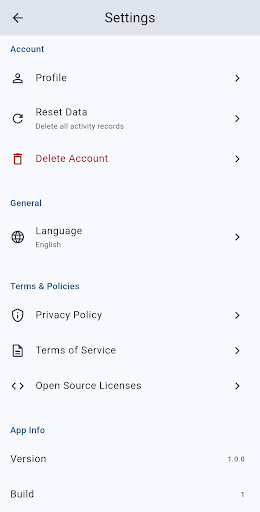
    • Cloud sync with social login: Sign in with Kakao, Naver, or Google. Your data syncs across devices automatically.
    • Multi-language support: The app works in both Korean and English, switching based on your device settings.
    What I Did - WID screenshot 3

    Who This Is For

    If you’re burned out on productivity guilt, this might resonate. It’s for people who want to feel good about their days instead of anxious about them. It’s for anyone who values simplicity over feature bloat, and accomplishment over obligation.

    It’s also for people like me—those who need to see evidence that they’re making progress, even when progress looks like small, mundane things. Sometimes the best productivity tool is the one that reminds you that you’re doing fine.

    What I Did - WID screenshot 4

    What I Did is available now on the Play Store. It’s free to use, and I’d love to hear what you think if you give it a try. Version 1.1.5 just shipped with some bug fixes, and I’m actively working on improvements based on user feedback.


    Download on Google Play: What I Did – WID

    Official page: reactiveworks.dev/apps/wid

  • Convert M4A Audio to Text and Translate with AI

    Convert M4A Audio to Text and Translate with AI

    Ever recorded a meeting, interview, or voice memo in M4A format and wished you could instantly convert it to searchable text? Or better yet, translate that audio into another language without manually transcribing it first? That’s the problem I set out to solve.

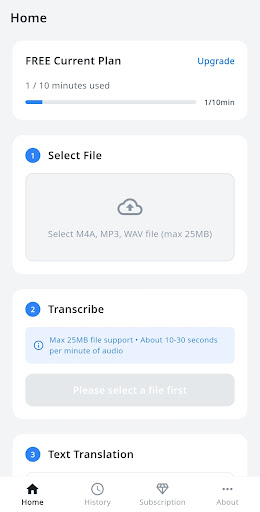
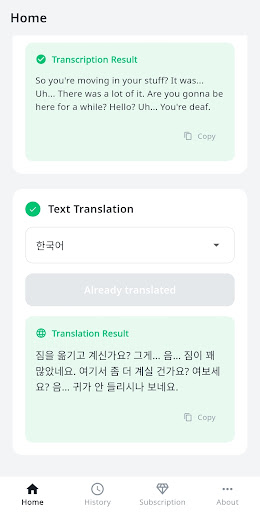
    M4A to Text & Translate screenshot 1

    I built M4A to Text & Translate because I kept running into this exact workflow bottleneck. I’d record audio on my phone, then waste time either typing it out by hand or jumping between multiple tools to transcribe and translate. I wanted something that could do both in one place, powered by the best AI available.

    The app uses OpenAI’s Whisper API for speech recognition and DeepL for translation. Whisper is remarkably accurate even with background noise or multiple speakers, and DeepL produces translations that actually sound natural rather than robotic.

    What It Does

    The workflow is straightforward: pick an M4A file from your device, tap convert, and get accurate text back in seconds. From there, you can translate that text into any of ten supported languages.

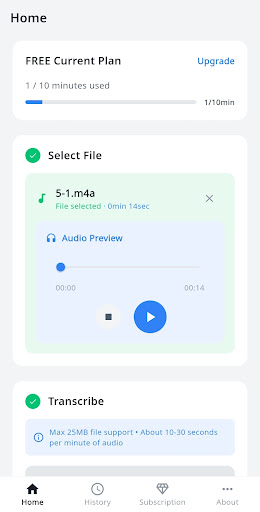
    M4A to Text & Translate screenshot 2
    • AI-powered transcription: OpenAI Whisper converts speech to text with industry-leading accuracy, handling accents and audio quality issues better than traditional speech recognition
    • Natural translation: DeepL translates your transcribed text into Korean, English, Japanese, Chinese, Spanish, French, German, Italian, Portuguese, or Russian
    • Built-in audio player: Preview your audio file before converting to make sure you’ve selected the right one
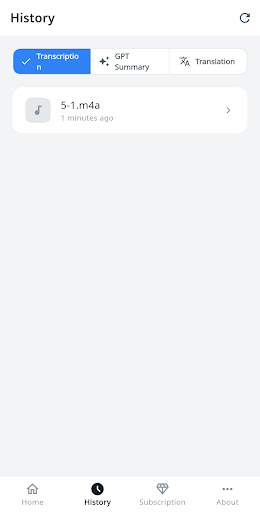
    • History management: All your past transcriptions and translations are saved so you can review, copy, or re-export them anytime
    • Real-time progress tracking: Watch the conversion happen in real time so you know exactly how long it’ll take

    The app works on a minute-based quota system. Free users get 10 minutes per month to test it out. If you’re transcribing regularly, the Basic plan gives you 100 minutes monthly, and Pro users get 300 minutes. You can also buy one-time top-ups if you occasionally need more.

    M4A to Text & Translate screenshot 3

    Who It’s For

    I originally built this for my own freelance work, but it turns out the use cases are pretty broad. Journalists and researchers can transcribe interview recordings. Students can convert lecture audio into notes and translate foreign language content. Remote workers can transcribe meeting recordings and share written summaries with their team.

    If you work with podcasts, conduct user research interviews, or just want to turn your voice memos into searchable text, this tool will save you hours of manual work.

    Privacy and Security

    One thing I prioritized from day one: your audio files are deleted immediately after processing. The app doesn’t store your recordings on any server beyond the few seconds needed to transcribe them. API keys are managed server-side, and all communication is encrypted with SSL/TLS.

    M4A to Text & Translate screenshot 4

    You can sign in with Google or email, and subscription billing is handled securely through Google Play. The tech stack includes Firebase for authentication and data management, so everything follows industry-standard security practices.

    If you’ve been looking for a fast, accurate way to transcribe and translate M4A audio files on Android, give it a try. The free tier is generous enough to test the full workflow, and the paid plans are designed for regular use without breaking the bank. You can reach me at siwooeo@gmail.com if you have questions or feature requests.


    Download on Google Play: M4A to Text & Translate

    Official page: reactiveworks.dev/apps/m4a-to-text

  • God Finger: Solve Group Decisions with Multi-Touch Magic

    God Finger: Solve Group Decisions with Multi-Touch Magic

    Ever stood in a circle arguing about who should take the penalty shot, or spent five minutes trying to fairly divide teams? Group decisions are surprisingly hard, especially when everyone’s watching and nobody wants to seem biased.

    I built God Finger to solve this with the most natural interface possible: everyone just puts a finger on the screen.

    God Finger - Random Pick&Team screenshot 1

    The idea came from watching friends waste time on basic decisions during game nights. We’d pull out random number generators or do rock-paper-scissors tournaments, but those felt clunky. I wanted something that felt magical—where the phone itself became the impartial judge, and everyone participated simultaneously.

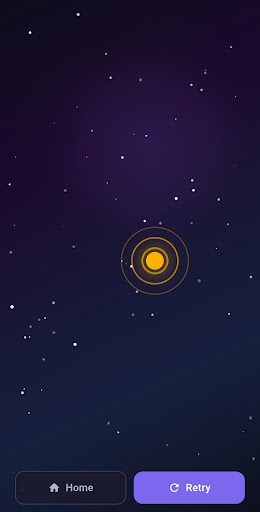
    So I built an app around multi-touch detection. It identifies each finger touching the screen, assigns it a unique color against a galaxy background, and handles the selection logic. No typing names, no taking turns. Just touch and go.

    What It Does

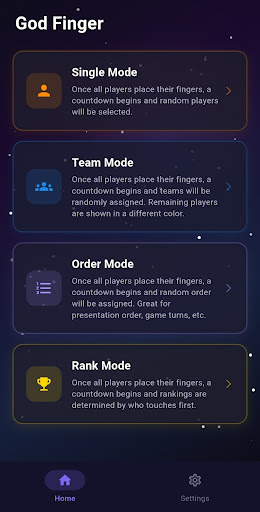
    God Finger has four modes, each solving a different group coordination problem:

    • Single Mode randomly selects one or more people from everyone touching the screen. Perfect for choosing who pays the bill, who’s “it” in a game, or who takes the penalty.
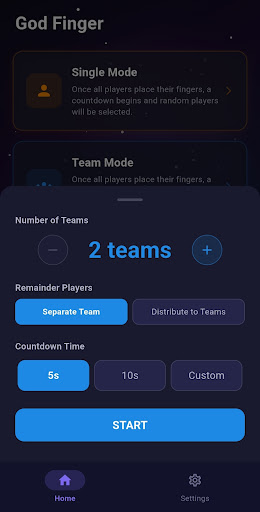
    • Team Mode instantly divides everyone into 2 to 8 teams. You can either keep remainder players as their own team or distribute them across existing teams.
    • Order Mode assigns a random sequence to everyone. Great for presentation order, turn-taking in board games, or duty rosters.
    • Rank Mode turns it into a reaction speed contest. When the countdown ends, everyone taps as fast as possible, and rankings are revealed simultaneously.
    God Finger - Random Pick&Team screenshot 2

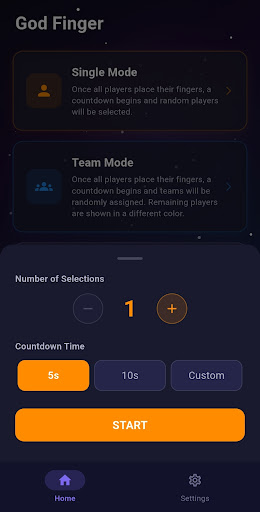
    Each mode features ripple animations that emanate from each finger, haptic feedback for tactile response, and a customizable countdown from 5 to 60 seconds. The app works completely offline—no internet required, no data collected.

    God Finger - Random Pick&Team screenshot 3

    I designed this for anyone who regularly deals with group decisions. Sports coaches splitting practice teams. Teachers assigning presentation order. Friends deciding who makes the coffee run. Party hosts running penalty games. The interface is simple enough that you can explain it in five seconds, which matters when you’re standing around with a group waiting to get on with things.

    The app supports Korean, English, Japanese, and Chinese, because fair random selection is a universal need.

    God Finger - Random Pick&Team screenshot 4

    God Finger 1.0.1 is available now on the Play Store. If you’ve ever needed a fast, fair way to make group decisions, give it a try. Place your fingers, let the app decide, and get back to what you were actually doing.


    Download on Google Play: God Finger – Random Pick&Team

    Official page: reactiveworks.dev/apps/god-finger