Tag: ai

  • I Built an AI Flashcard App That Actually Saves Time

    I Built an AI Flashcard App That Actually Saves Time

    Making flashcards by hand is tedious. You spend more time formatting cards than actually studying. I built MementoAI to fix that: paste any text — lecture notes, articles, textbook chapters — and AI generates flashcards for you in seconds.
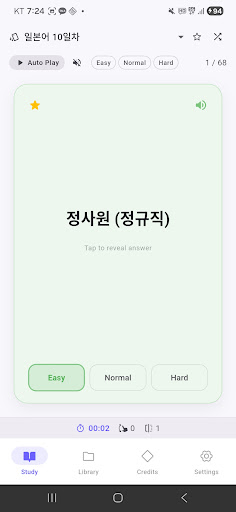
    MementoAI - AI Made Flashcards screenshot 1

    I built this because I was tired of watching students (and myself) waste hours manually creating study materials. The actual learning should be the focus, not the busywork of card creation. AI is finally good enough to extract key concepts and format them properly, so I wrapped that capability into a swipe-friendly mobile app.

    The core idea is simple: you provide the content, AI does the heavy lifting, and you focus on retention. No more copying and pasting into templates. No more deciding what counts as “front” versus “back.” Just dump your text and start studying.

    What It Does

    MementoAI is built around a few core workflows that make studying faster and more consistent:

    • AI-powered card generation: Paste any text and the AI analyzes it to create front/back flashcards. You can provide example cards to customize the format, and it works across subjects — vocabulary, history, science, certification prep, whatever you’re studying.
    • Swipe-based learning: Tap to flip cards, swipe left or right to mark what you know. Filter by favorites, difficulty, or shuffle mode. You can even navigate with volume keys for hands-free review.
    • Floating bubble reminders: A floating bubble pops up throughout the day with flashcards, so you can study passively while using other apps. Customize intervals, card counts, and quiet hours. Filter by folder, deck, or difficulty to focus on weak spots.
    • Share decks with friends: Generate a share code to send entire decks or folders to classmates. Anyone can claim shared materials with a code or deep link, and preview content before importing. Great for study groups.
    • Study statistics and streaks: Track daily, weekly, and monthly study time, swipes, flips, and efficiency. Maintain a daily streak with visual feedback, and see which decks you’re actually using.
    • Text-to-speech playback: Auto-play mode reads cards aloud with adjustable speech rate. Sequence mode lets you listen continuously, which is especially useful for language learning.
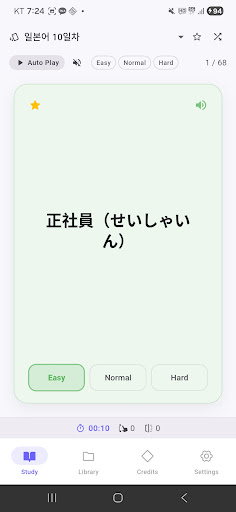
    MementoAI - AI Made Flashcards screenshot 2

    The app supports folder-based organization with custom icons and colors, drag-and-drop reordering, and bulk operations. It also has dark mode and multi-language support (English, Korean, Japanese).
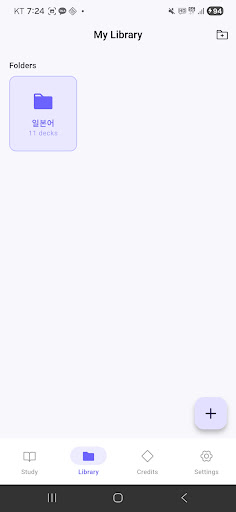
    MementoAI - AI Made Flashcards screenshot 3

    Who It’s For

    This app is for anyone who needs to memorize information but doesn’t want to spend hours setting up their study system. Students preparing for standardized tests, professionals studying for certifications, language learners building vocabulary, or study groups sharing materials — if you’re dealing with large amounts of text that need to become flashcards, this will save you time.

    The floating bubble feature is particularly useful if you want to fit studying into idle moments throughout the day without opening a dedicated app. The share codes make it easy to collaborate, which is helpful if you’re part of a class or group where everyone’s studying the same material.
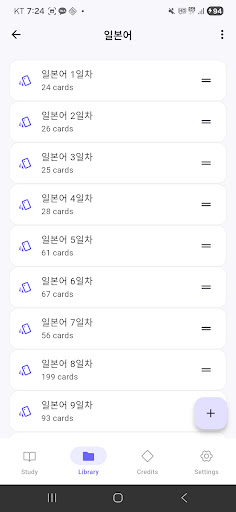
    MementoAI - AI Made Flashcards screenshot 4

    Try It Out

    The app is free to start, with welcome credits included. You can earn more by watching rewarded ads or leaving a review. Version 1.0.4 just shipped with bug fixes for statistics and bubble notifications.

    If you’re tired of manual flashcard creation, give it a try. It’s designed to get out of your way and let you focus on the actual studying.


    Download on Google Play: MementoAI – AI Made Flashcards

    Official page: reactiveworks.dev/apps/mementoai
  • Convert M4A Audio to Text and Translate with AI

    Convert M4A Audio to Text and Translate with AI

    Ever recorded a meeting, interview, or voice memo in M4A format and wished you could instantly convert it to searchable text? Or better yet, translate that audio into another language without manually transcribing it first? That’s the problem I set out to solve.

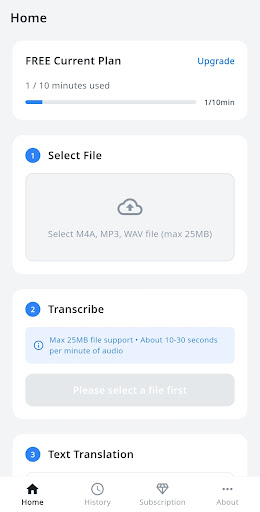
    M4A to Text & Translate screenshot 1

    I built M4A to Text & Translate because I kept running into this exact workflow bottleneck. I’d record audio on my phone, then waste time either typing it out by hand or jumping between multiple tools to transcribe and translate. I wanted something that could do both in one place, powered by the best AI available.

    The app uses OpenAI’s Whisper API for speech recognition and DeepL for translation. Whisper is remarkably accurate even with background noise or multiple speakers, and DeepL produces translations that actually sound natural rather than robotic.

    What It Does

    The workflow is straightforward: pick an M4A file from your device, tap convert, and get accurate text back in seconds. From there, you can translate that text into any of ten supported languages.

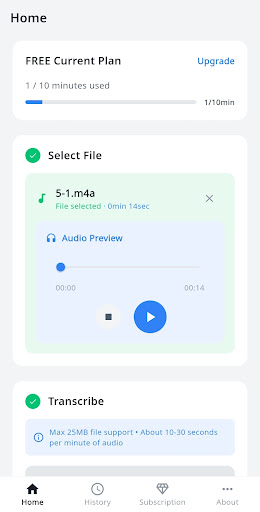
    M4A to Text & Translate screenshot 2
    • AI-powered transcription: OpenAI Whisper converts speech to text with industry-leading accuracy, handling accents and audio quality issues better than traditional speech recognition
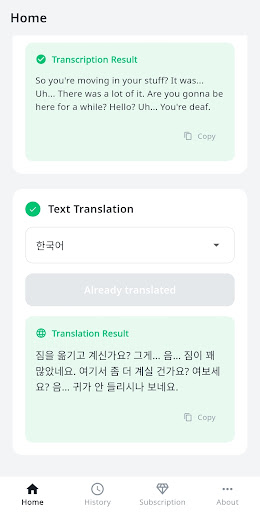
    • Natural translation: DeepL translates your transcribed text into Korean, English, Japanese, Chinese, Spanish, French, German, Italian, Portuguese, or Russian
    • Built-in audio player: Preview your audio file before converting to make sure you’ve selected the right one
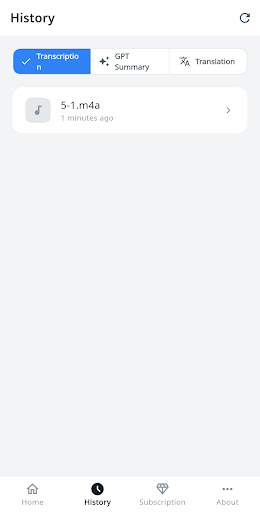
    • History management: All your past transcriptions and translations are saved so you can review, copy, or re-export them anytime
    • Real-time progress tracking: Watch the conversion happen in real time so you know exactly how long it’ll take

    The app works on a minute-based quota system. Free users get 10 minutes per month to test it out. If you’re transcribing regularly, the Basic plan gives you 100 minutes monthly, and Pro users get 300 minutes. You can also buy one-time top-ups if you occasionally need more.

    M4A to Text & Translate screenshot 3

    Who It’s For

    I originally built this for my own freelance work, but it turns out the use cases are pretty broad. Journalists and researchers can transcribe interview recordings. Students can convert lecture audio into notes and translate foreign language content. Remote workers can transcribe meeting recordings and share written summaries with their team.

    If you work with podcasts, conduct user research interviews, or just want to turn your voice memos into searchable text, this tool will save you hours of manual work.

    Privacy and Security

    One thing I prioritized from day one: your audio files are deleted immediately after processing. The app doesn’t store your recordings on any server beyond the few seconds needed to transcribe them. API keys are managed server-side, and all communication is encrypted with SSL/TLS.

    M4A to Text & Translate screenshot 4

    You can sign in with Google or email, and subscription billing is handled securely through Google Play. The tech stack includes Firebase for authentication and data management, so everything follows industry-standard security practices.

    If you’ve been looking for a fast, accurate way to transcribe and translate M4A audio files on Android, give it a try. The free tier is generous enough to test the full workflow, and the paid plans are designed for regular use without breaking the bank. You can reach me at siwooeo@gmail.com if you have questions or feature requests.


    Download on Google Play: M4A to Text & Translate

    Official page: reactiveworks.dev/apps/m4a-to-text