
If you’ve ever stared at a blank prompt field in Stable Diffusion or Midjourney, paralyzed by the sheer number of tags you could use but can’t quite remember, you know the problem. Great AI images require precise prompts, but building them from scratch is tedious and error-prone.
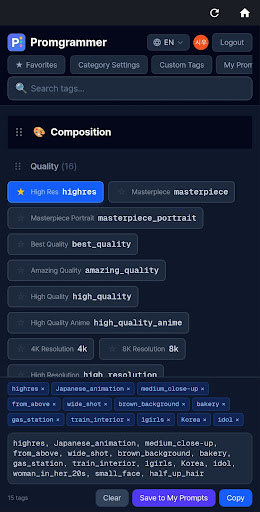
I built Promgrammer to solve this exact friction. Instead of Googling “best lighting tags for anime” or digging through Reddit threads, you get 1700+ curated tags organized into 18 categories — composition, lighting, clothing, poses, expressions, and more. Tap what you want, drag to reorder, copy, and paste. That’s it.
What It Does
Promgrammer is a tag browser and prompt assembler. You navigate categories like “Lighting” (backlight, golden hour, rim light) or “Pose” (standing, kneeling, floating), tap tags to add them to your workspace, then rearrange them with drag-and-drop. When you’re done, hit copy and paste the result into your AI tool.
All tags display in four languages — Korean, English, Japanese, and Chinese — so you can work in whichever feels most natural.
Key Features
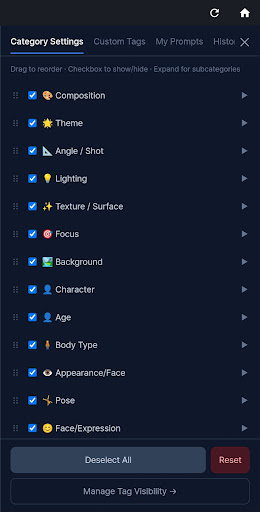
- 1700+ tags across 18 categories — Composition, theme, focus, background, body type, appearance, pose, expression, action, colors, negative prompts, clothing, accessories, angle, age, lighting, and texture.
- Real-time search — Filter by tag name, category, or subcategory instantly.
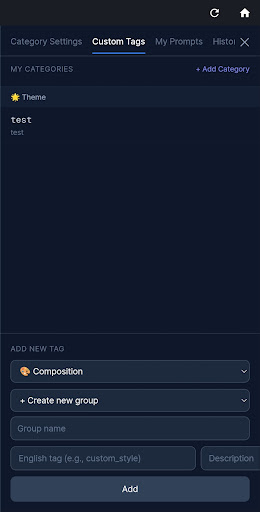
- Favorites and custom tags — Save your go-to tags and create your own for recurring combinations.
- Prompt library — Save completed prompts with notes and attach generated images to visually track what worked.
- Drag-and-drop reordering — Rearrange both tags within prompts and category order in the UI. Settings auto-save to your account.
- Tag hiding — Declutter your workspace by hiding tags you never use.
- History — Previously copied prompts auto-save for easy recall.
Who It’s For
This is for anyone who generates AI images but finds prompt crafting slow or intimidating. Beginners get a structured learning path through categories instead of a wall of text. Experienced users save time by skipping the “what was that one lighting tag?” searches. Non-native English speakers can browse tags in their language, then export the English version for compatibility with most models.
If you’re the kind of person who keeps a sprawling text file of prompts or screenshots of other people’s generations just to steal their tags, Promgrammer replaces that chaos with a searchable, reusable library.

Getting Started
Core features work immediately after install. Sign in with Google to unlock favorites, prompt saving, custom tags, and the image gallery — basically everything that makes the app worth using long-term.
I’ve been using it myself for a few months now, and the workflow feels significantly faster than my old method of copy-pasting from a Notion doc. If you generate AI art with any regularity, it’s worth a try.
Download on Google Play: Promgrammer-AI Prompt Builder
Official page: reactiveworks.dev/apps/promgrammer
Leave a Reply